

What is DMARC?
DMARC, or (Domain-based Message Authentication, Reporting & Conformance) is an email protocol that enhancing SPF and DKIM by enhancing by validating and reporting on the status of mails sent by your domain. When a mail is sent from your domain, it is assessed by the recipient servers which then follow the instructions published within your DMARC policy, including reporting back on the status.
One of the common challenges organisations have with implementing DMARC is how to parse the reports. A typical DMARC report takes the form of an email report in XML format. Parsing through these individual reports is cumbersome and takes a lot of effort to get any meaningful conclusion.
Challenges with Implementing DMARC
Many organisations struggle with implementing DMARC enforcement because they are not sure where they actually send mails from. The obvious place emails will come from is an organisations mail server or Exchange Online environments, but there are also marketing systems, mass mailers, ticketing systems and other services which send mail on behalf of your domain. Enforcing policies could cut out critical services from sending mail. DMARC allows you to set up in a monitoring configuration initially to gather the data around your mail domain, but this requires you to parse each report and summerize.
A Free DMARC Service
Something that many customers I talk to don’t realise, is that this process is made much easier through Microsoft 365 and Valimail. Valimail offer free DMARC monitoring for Office 365 tenants through their partnership with Microsoft. Valimail Monitor will help you set up your DMARC record, complete with initial unenforced policies and move it to enforced.
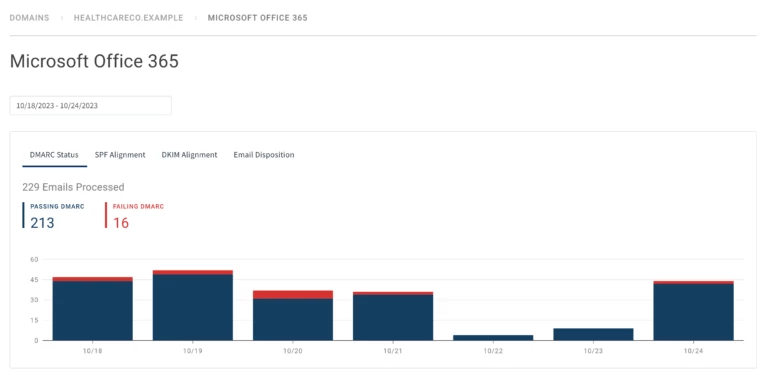
While Valimail have further services which provide enhanced featuresets, the monitoring offer provides an excellent free offer to help organisations get DMARC in place and aligned. Once the quick set up is done, you can have your DMARC policy reporting configuration done in minutes. Afther that, you simply wait for the reports to come in to Valimail, usually I recommend a month or two for this. Once data has been gathered, you will be presented with a nice, easy to read report summerizing the data as shown in Figure 1.
Setting Up Valimail
Setting up Valimail for Office 365 is simple. Just register on the Valimail site here, and once approved, you’ll get access to your dashboard. Once here, you can add a domain and follow the on-screen instructions to build your DMARC record (Figure 2):
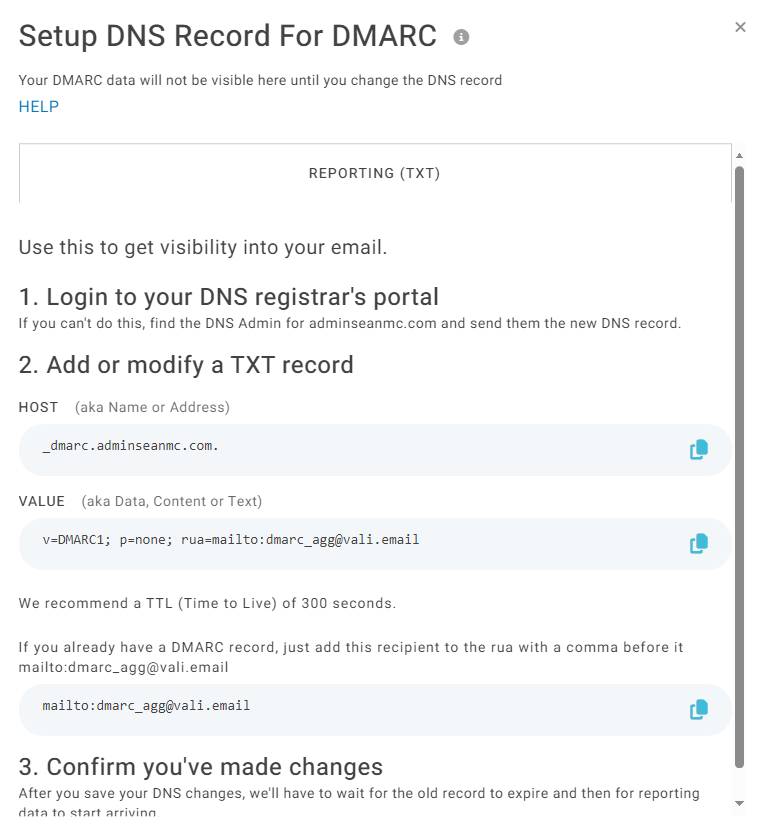
You can also link Valimail directly to your DNS providor to perform the DNS updates for you. Once your records are in place and you’re happy with the reports, you can then easily move the record to enforce to finish your DMARC update.
Summary
This is a service I find many customers I speak to are unaware of but absolutly worth looking at if you are in Microsoft 365. As more and more email threats are reported every day, having an easy way to improve your email hygeine without additional cost is a no-brainer!
 Sean McAvinue