

A Positive Step, But Many Organizations Are Behind
Hopefully by now you’re aware that Microsoft are rolling out the enforcement of MFA for the admin portals for all users. Looking at the comments on Microsofts announcement, many organizations are not ready for this change. Before I get into the article, I’ll address a few common queries:
- MFA will be enforced for ALL accounts? Yes
- Do you really mean ALL? Yes
- What about service / non-user accounts and Emergency Access / Break Glass accounts? Yes
- REALLY? Yes
In move move that is welcomed by security consious tenant administrators, and less-welcomed by many others, Microsoft will be enforcing MFA for access to the admin portals for all accounts with no exceptions.
The timeline as it stands is shown below, with the Azure portal rollout already well underway.
| Application Name | App ID | Enforcement phase |
|---|---|---|
| Azure portal | c44b4083-3bb0-49c1-b47d-974e53cbdf3c | Second half of 2024 |
| Microsoft Entra admin center | c44b4083-3bb0-49c1-b47d-974e53cbdf3c | Second half of 2024 |
| Microsoft Intune admin center | c44b4083-3bb0-49c1-b47d-974e53cbdf3c | Second half of 2024 |
| Azure command-line interface (Azure CLI) | 04b07795-8ddb-461a-bbee-02f9e1bf7b46 | Early 2025 |
| Azure PowerShell | 1950a258-227b-4e31-a9cf-717495945fc2 | Early 2025 |
| Azure mobile app | 0c1307d4-29d6-4389-a11c-5cbe7f65d7fa | Early 2025 |
| Infrastructure as Code (IaC) tools | Use Azure CLI or Azure PowerShell IDs | Early 2025 |
For some organizations, who have been dilligently following Microsofts best practice recommendations (Including protecting emergency access accounts with FIDO2 tokens) this is a minor change. For the majority though, there’s some scrambling to be done. In this article, I’ll look at some of the things you’ll need to watch out for as part of this rollout.
What About Emergency Access Accounts?
Emergency Access or “Break-Glass” accounts are administrative accounts to be used only in an emergency such as a tenant-wide lockout. These accounts should be exempt from Conditional Access policies and should be monitored and alerts on when used.
Previously, the guidance for these accounts was that they should not have MFA enforced (in case of an MFA outage) however this guidance has been updated recently. The current guidance is to leverage phishing resistant authentication methods such as FIDO2 security keys for emergency access accounts.
I won’t go into the details of these here but this should be a top priority for administrators. Because these accounts (by design) don’t get used often, it’s easy to forget this and then become locked out of the account in an emergency.
What About Legitimate Exceptions?
The term legitimate exceptions has come up a few times on the Microsoft announcement pages. To be frank, given the long standing recommendation to move applications to use service principals instead of user accounts, and the ease at which this can be set up (just check any of my Graph API scripts), there shouldn’t really be legitimate exceptions, particularly for accounts with admin roles.
That doesn’t mean many organizations and app vendors don’t have a problem to solve, but it should make sense to move authentication to use service principals for them too, even if it’s a bit painful getting there.
Will I Be Impacted?
This is the big question for many organizations. How do we know if we will be impacted? There are a few angles of approach here.
First, you can report on registered MFA methods with scripts like the one described here. Knowing is half the battle and a quick report will rule out many of your accounts as being an issue once they have MFA registered.
Next, gather the information. If you have’t already, it’s very easy to ingest your Entra sign-in logs into Log Analytics to allow you to query for the use of MFA and the hisorical sign-ins for specific accounts.
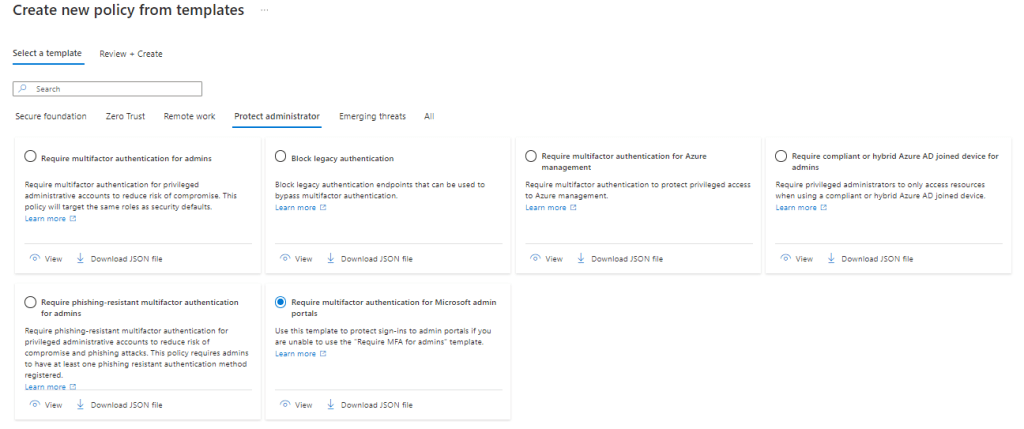
Finally, you should move towards enabling MFA for admin portals yourself before Microsoft do it for you. If you use security defaults in your tenant, you’re already there. If not, you can deploy conditional access policies to enforce MFA ahead of time. The conditional access templates in Microsoft Entra contain a wealth of policy examples that you can pick from to get started. For this task, take a look under the “Protect administrator” section and “Require multifactor authentication for Microsoft admin portals”. You may want to modify the policy slightly to expand the scope to all users but it will get you started!
Don’t Panic!
While not as bad as the long slog towards blocking legacy authentication in Microsoft 365, this is a move towards a baseline level of common sense security controls built into the platform. Administrators will need to work through it and test applications and emergency access accounts but at the end, the benefits of this enforcement are huge. If you’re not sure about how to go about this, reach out to a trusted partner or to your Microsoft account team to get advise.
 Sean McAvinue