

Office 365 ATP is a fantastic tool for protecting Office 365 users from threats such as spam, phishing and malicious content. A lot of the time, as consultants, the initial set up of these policies is pretty similar from customer to customer with some potential change on granular items such as thresholds and actions. Often …
Exchange Online Migrations and EWS Throttling
Merging and splitting Office 365 data from tenant to tenant is becoming more and more common recently as the platform grows and more organizations are stepping down on-premise systems in favor of leveraging cloud services for mail and collaboration. A cornerstone of Microsoft's cloud offering is Exchange Online, which has been active now for more …
Continue reading Exchange Online Migrations and EWS Throttling
Azure Migrate
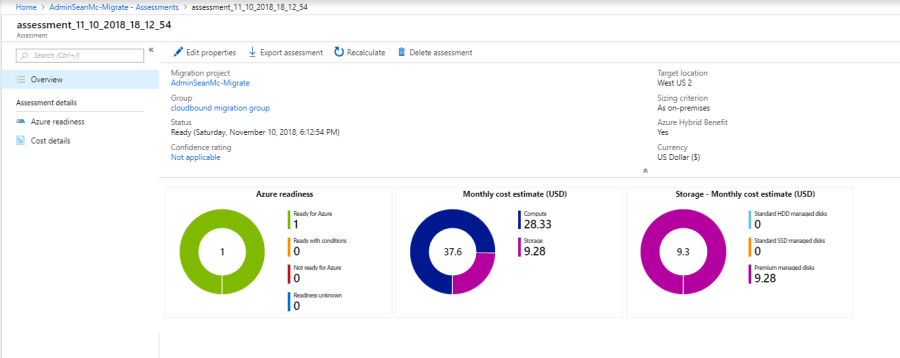
With more and more enterprise organizations moving to the cloud every day, it can get confusing to map requirements and costings when moving from an on-premise environment. The Azure Migrate Service allows us to very quickly get hard data on what our azure footprint will look like. In this blog I will go through the …
Update to Microsoft Teams PowerShell Module (v 0.9.5)
Microsoft have recently released a much-needed updated version of the Microsoft Teams PowerShell module. The updated module brings a lot of much needed functionality that previously would have required workaround to programmatically access the Teams config. While the module is not quite there yet, it’s good to have these improvements available. To install the module, …
Continue reading Update to Microsoft Teams PowerShell Module (v 0.9.5)
Send Azure AD Audit and Sign-In Logs to Azure Log analytics
Microsoft have recently announced the availability of Azure Log analytics for Azure AD sign-in and audit logging. This is a really cool feature, especially for large organizations where there will be a lot of traffic to audit. In this post I will go through the basic setup. Prerequisites: Azure AD Global Admin Azure Subscription Log …
Continue reading Send Azure AD Audit and Sign-In Logs to Azure Log analytics
Implementing Privileged Access Management on Server 2016/2019: Part 4 – Finalize Configuration and Test PAM Requests
Implementing Privileged Access Management on Server 2016/2019: Part 1 – Setting up the Privileged Domain Implementing Privileged Access Management on Server 2016/2019: Part 2 – Installing and Configuring SharePoint Server 2016 for Microsoft identity Manager Implementing Privileged Access Management on Server 2016/2019: Part 3 – Deploying the MIM/PAM Server It's been a few weeks since …
Implementing Privileged Access Management on Server 2016/2019: Part 3 – Deploying the MIM/PAM Server
Implementing Privileged Access Management on Server 2016/2019: Part 1 – Setting up the Privileged Domain Implementing Privileged Access Management on Server 2016/2019: Part 2 – Installing and Configuring SharePoint Server 2016 for Microsoft identity Manager In part three of this blog series, I will go through the steps to deploy the MIM/PAM server to host …
Implementing Privileged Access Management on Server 2016/2019: Part 2 – Installing and Configuring SharePoint Server 2016 for Microsoft identity Manager
Implementing Privileged Access Management on Server 2016/2019: Part 1 - Setting up the Privileged Domain This is the second post in a series which will go through setting up Privileged Access Management on Server 2016/2019. in this post we will configure the SharePoint component of Microsoft Identity Manager. *As I am using a lab environment …
Microsoft Teams Meeting Settings
This week Microsoft are rolling out the Meeting Settings configuration to the Microsoft Teams & Skype for business Admin Center in Office 365! This configuration page will allow admins to define teams meeting settings such as Email Invitation URLs and Network and QoS configuration. This allows us to very easily mark real-time media traffic packets …
Implementing Privileged Access Management on Server 2016/2019: Part 1 – Setting up the Privileged Domain
In many companies, users with admin accounts for different services are trusted to only use their admin privileges when there is a requirement that needs to be met. We rely on logging to track changes and many companies very rarely review logs until an issue is discovered elsewhere. As IT Admins, we get stuck between …

